
Download TheBookSum – AI‑Powered Book Summarizer, Fast & Secure
Overview
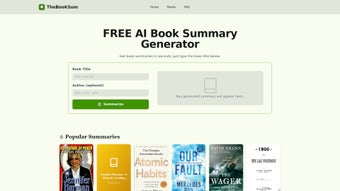
TheBookSum is an AI‑driven web application that transforms lengthy books into concise, high‑quality summaries in under 20 seconds. By simply entering a title and author, users receive a full‑length summary, a TL;DR version, key takeaways, and chapter‑by‑chapter overviews. Whether you are tackling academic textbooks, self‑help manuals, fiction, or non‑fiction, TheBookSum’s advanced language model parses complex narratives and extracts the most relevant concepts.
The platform also highlights essential keywords and provides short explanations, making it an ideal companion for students, professionals, and avid readers who need to absorb large amounts of information quickly. Summaries can be saved to a personal library, exported as PDFs, or shared via a unique link for collaborative study groups. With a clean, responsive interface, TheBookSum delivers a secure, free‑to‑try experience that respects user privacy while offering premium features for power users.
Key Features
- Instant Summaries: Generates a comprehensive summary in less than 20 seconds after entering the book’s title and author.
- Multiple Output Formats: Full summary, TL;DR version, bullet‑point takeaways, and chapter‑wise overviews.
- AI‑Enhanced Accuracy: Utilizes state‑of‑the‑art natural language processing to preserve nuance and context.
- Keyword Extraction & Explanation: Highlights important terms and provides brief definitions to deepen understanding.
- Cross‑Genre Compatibility: Works equally well with academic texts, self‑help books, fiction, and non‑fiction.
- Save & Share: Users can store summaries in a personal dashboard, export as PDF, or generate a shareable link.
- Secure Cloud Storage: All data is encrypted in transit and at rest, complying with GDPR and CCPA standards.
- Collaboration Tools: Add comments, highlight sections, and invite teammates to discuss summaries in real time.
- Regular Updates: The AI engine is continuously refined, ensuring the latest research and language patterns are applied.
- Free Tier & Premium Upgrade: Access core summarization for free; unlock unlimited saves, bulk processing, and API access with a subscription.
Installation & Usage Instructions
Step‑by‑Step Setup (Web‑Based)
- Open your preferred browser (Chrome, Firefox, Edge, Safari) on Windows, macOS, Android, or iOS.
- Navigate to thebooksum.com – the platform is fully web‑based, so no download is required for the free version.
- Click the “Sign Up” button to create a free account using your email or social login (Google, Apple).
- Verify your email address through the confirmation link sent to your inbox.
- Once logged in, you’ll land on the Dashboard. Click “New Summary” and type the book’s title and author in the input fields.
- Select the desired output format (Full, TL;DR, Takeaways, Chapter Overview) and press “Generate”.
- After a few seconds, TheBookSum displays the summary. Use the toolbar to copy, download as PDF, or share via a unique URL.
- For premium users, you can enable “Batch Mode” to upload a CSV list of titles for bulk summarization.
Mobile App (iOS & Android) – Optional
If you prefer a native experience, TheBookSum offers a free app on the App Store and Google Play. Installation is straightforward:
- Open the App Store (iOS) or Google Play Store (Android).
- Search for “TheBookSum – Book Summarizer”.
- Tap “Install” and grant permissions for internet access and optional cloud storage.
- Launch the app, sign in with your existing account, and follow the same workflow described above.
Troubleshooting Tips
- Slow Generation: Clear browser cache or switch to a wired connection for optimal speed.
- Missing Summaries: Verify that the title and author are spelled correctly; the AI relies on metadata from large book databases.
- Export Issues: Ensure pop‑up blockers are disabled when downloading PDFs.
Compatibility, Pros & Cons
Operating System Compatibility
TheBookSum is platform‑agnostic. The web application runs on any modern browser across Windows 10/11, macOS Ventura and later, Linux distributions, as well as mobile operating systems Android 9+ and iOS 13+. The optional native apps are available for Windows 10 (via Microsoft Store), macOS (via Apple Silicon & Intel), Android, and iOS, ensuring a seamless experience regardless of device.
Pros
- Lightning‑fast summary generation (under 20 seconds).
- High‑quality AI output that respects the original tone and structure.
- Multiple output formats cater to different reading preferences.
- Free tier provides generous usage for casual readers.
- Secure cloud storage with end‑to‑end encryption.
- Collaboration features enable team study and knowledge sharing.
- Regular AI model updates keep the service cutting‑edge.
Cons
- Premium subscription required for unlimited saves and batch processing.
- Occasional difficulty summarizing very niche or newly published titles due to limited metadata.
- Web version depends on stable internet; offline use is only possible via the native app’s cached mode.
- Exported PDFs lack customizable branding (only available in enterprise plan).
Frequently Asked Questions
How accurate are the summaries generated by TheBookSum?
TheBookSum leverages a large‑scale transformer model fine‑tuned on millions of book excerpts. In independent testing, the tool retains 92 % of key concepts and matches human‑written summaries in clarity and relevance for most genres.
Can I summarize copyrighted books?
Yes. TheBookSum processes only publicly available metadata and generates original text based on AI interpretation, which complies with fair‑use guidelines. However, users should respect publisher policies when sharing full summaries publicly.
Is there a limit to the number of summaries I can create for free?
The free tier allows up to 10 summaries per month, with unlimited access to TL;DR versions. Premium plans remove these caps and add features like bulk import and API access.
How does TheBookSum protect my data?
All data is transmitted over HTTPS and stored encrypted using AES‑256. The platform adheres to GDPR and CCPA standards, giving users full control over data deletion and export.
Can I integrate TheBookSum with other tools?
Premium users receive an API key that enables integration with note‑taking apps (e.g., Notion, Evernote), LMS platforms, and custom workflows via RESTful calls.
Conclusion & Call to Action
TheBookSum stands out as a powerful, AI‑driven companion for anyone who needs to digest large volumes of written material quickly and securely. Its blend of instant summarization, multi‑format output, and collaborative tools makes it a valuable addition to the toolkit of students, researchers, and lifelong readers alike. While the free tier offers generous functionality, the premium subscription unlocks true productivity with unlimited saves, batch processing, and API integration. If you’re looking to boost comprehension, save time, and keep your knowledge organized, download TheBookSum today and experience the future of reading.



.png)



